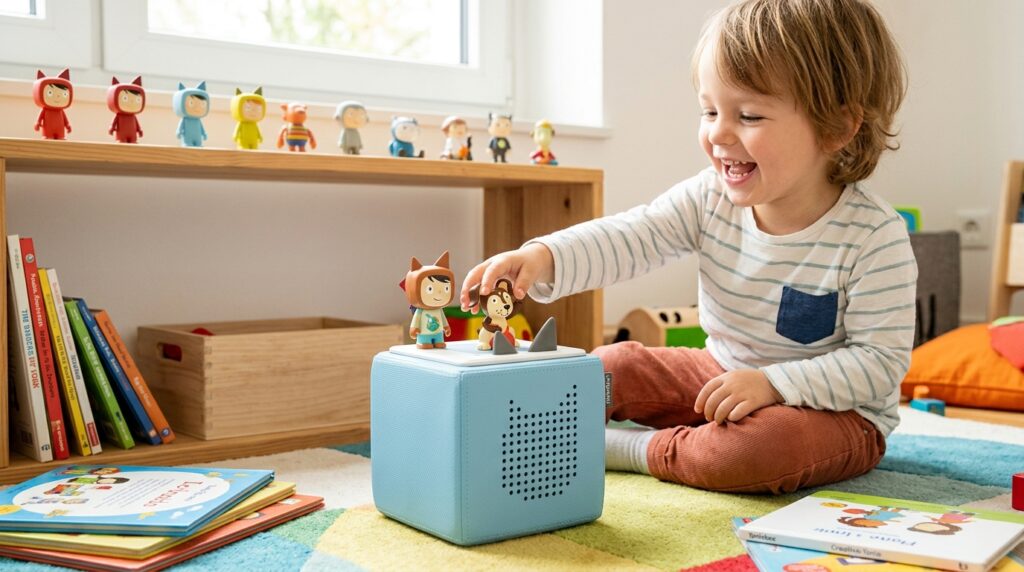

Choosing the right audio player for children can be difficult when parents want entertainment without relying on screens. A Tonie box offers a simple way for children to listen to stories, music, audiobooks, and other audio content using physical Tonies.
The Toniebox 2 is the newer version of the Toniebox and is designed for children aged 1 and up. It combines screen-free listening with child-friendly controls, a built-in light ring, sleep features, a sunrise alarm, and compatibility with different types of Tonies. It also supports Tonieplay, an interactive audio gaming system designed for children.
What Is a Tonie Box?
It is a screen-free audio player designed for children. Instead of navigating a traditional digital interface, children place a compatible Tonie figure on top of the player to start listening to its content.
The Toniebox 2 is the current generation of the product and is certified for children aged 1 and older. It is designed with simple controls and a durable body intended for everyday use by children.
How Does the Tonie Box Work?
The basic operation is simple. A child places a Tonie on the Toniebox 2, and the associated audio content can begin playing.
The first setup and initial content download require a Wi-Fi connection. Once content has been downloaded to the device, previously downloaded content can be played without an active Wi-Fi connection.
Children can control playback using the physical controls on the device. Depending on the function, they can adjust volume, move between tracks, and interact with the player without needing a screen.
What Are Tonies?
Tonies are physical audio figures that contain or represent different audio content. The Tonies collection includes characters, stories, songs, audiobooks, and other types of children’s entertainment.
There are also Creative-Tonies, which allow parents to add their own compatible audio content through the mytonies app.
Different Tonies have different recommended age ranges, so parents should check the age recommendation for an individual Tonie before giving it to a child.
What Is Toniebox 2?
Toniebox 2 is the newer generation of the children’s audio player. Compared with the original Toniebox, it introduces several additional features, including a dynamic light ring, USB-C charging, Sleep Timer with Light, Sunrise Alarm, Bedtime Mode, and compatibility with Tonieplay. It also has 32 GB of storage, compared with 8 GB on the original Toniebox.
Who Is Toniebox 2 Designed For?
Toniebox 2 is designed for children aged 1+. Its content can be used across different childhood stages, but the appropriate choice depends on the individual Tonie’s recommended age range.
Younger children can use age-appropriate songs, sounds, and simple stories, while older children can explore longer audiobooks, facts, Pocket Tonies, Book Tonies, and compatible Tonieplay games.
Tonie Box Features for Kids
The features of a Tonie box are designed around simple, screen-free audio listening rather than complicated menus or touchscreens.
Screen-Free Audio Listening
One of the central features of Toniebox 2 is screen-free entertainment. Children can listen to audio without using a smartphone, tablet, or television screen.
This makes the device suitable for situations such as quiet time, travel, playtime, or listening to stories before bed.
Simple Child-Friendly Controls
Toniebox 2 uses physical controls rather than a traditional touchscreen interface. Children can interact with the player through its buttons, ears, and other simple controls. The design is intended to make everyday listening straightforward for young users.
Durable, Kid-Friendly Design
The Toniebox 2 has a rounded, soft-feeling design made for children’s everyday use. Tonies describes the device as robust and designed to withstand the normal handling associated with young children. Its rounded shape also avoids sharp external corners.
Dynamic Light Ring
Tonie box 2 includes a dynamic light ring that can provide visual feedback and work with some of its sleep and listening features.
The light ring is part of the newer design and is not available on the original Toniebox.
Sleep Timer and Bedtime Mode
Toniebox 2 includes a Sleep Timer with Light and a Bedtime Mode. These features are designed to help families incorporate audio listening and lighting into bedtime routines. They should not be treated as a guarantee of improved sleep.
Sunrise Alarm
The Tonie box 2 also includes a Sunrise Alarm. The feature uses the device’s light and alarm functions to provide a gradual wake-up experience. Parents can configure supported settings through the mytonies app.
USB-C Charging
Unlike the original Toniebox, which uses a charging station, Toniebox 2 uses USB-C charging. The included cable and appropriate power supply can be used to charge the device.
Headphone Connectivity
Toniebox 2 supports headphone connectivity, giving children another option for private listening when compatible headphones are used. Parents should still follow age-appropriate volume and headphone-use practices.
App Controls
The mytonies app provides additional controls and settings for Toniebox 2. Depending on the supported feature, parents can manage settings, check battery status, control playback, and configure certain functions.
The app therefore provides parents with controls that are not available directly through the physical player.
What Can Kids Do With a Tonie Box?
A Tonie box can be used for more than traditional children’s songs. The available experience depends on the Tonies and other compatible content a family chooses.
Listen to Stories
Children can use story-based Tonies to listen to familiar characters, narrated stories, and other audio adventures. This gives children an alternative to watching a video when they want entertainment.
Enjoy Music and Songs
Music Tonies provide songs and other audio designed for children. Younger listeners can explore simple songs and sound-based content, while older children can choose content that matches their interests.
Explore Audiobooks
Older children can use Book Tonies and other suitable audio content for longer listening sessions. The available selection varies by market and individual Tonie.
Use Creative-Tonies
Creative-Tonies allow families to add compatible personal audio content. Parents can use the mytonies app to manage content for a Creative-Tonie, giving families more flexibility than relying only on commercially produced Tonies.
Discover Pocket and Book Tonies
Pocket Tonies and Book Tonies provide additional options for older children. Pocket Tonies can cover subjects such as facts, jokes, hobbies, careers, emotions, and everyday routines.
Each individual product has its own recommended age range, so parents should check the product information before choosing one.
Play Tonieplay Games
Toniebox 2 is compatible with Tonieplay, an interactive audio gaming system. Tonieplay games can provide activities that go beyond simply listening to a story. Compatibility and age recommendations vary by individual game.
Benefits of a Tonie Box for Kids
The practical benefits of a Tonie box depend on how a child and family use it. Its main appeal is the combination of simple controls, physical content, and screen-free audio.
Provides Screen-Free Entertainment
A Tonie box lets children enjoy stories and music without watching a display. For parents looking to reduce the amount of screen-based entertainment in certain parts of the day, this provides another activity option.
Encourages Independent Listening
Because children can operate many of the basic controls themselves, Toniebox 2 can give them more independence during listening. The amount of independence will naturally depend on the child’s age and familiarity with the device.
Makes Stories More Interactive
Physical Tonies make audio content tangible. Children can choose a character or other Tonie and place it on the player themselves. Tonieplay adds another interactive option for compatible games.
Supports Imaginative Play
Stories, songs, and audio adventures can be used alongside children’s existing play activities. Rather than requiring a screen to display characters and scenes, the audio leaves children to imagine the story environment themselves.
Gives Children Control Over Their Listening
The physical design allows children to select content and use simple playback controls. This can make choosing what to hear part of the listening experience.
Can Become Part of Bedtime and Quiet-Time Routines
Families can incorporate audio into quiet time or bedtime routines. Toniebox 2 also includes specific bedtime-related features such as the Sleep Timer with Light and Bedtime Mode. These features are tools for routines rather than guarantees of a particular sleep outcome.
Tonie Box Age Guide: Which Age Is It For?
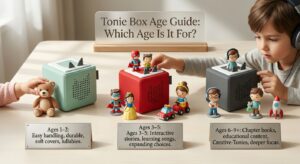
Toniebox 2 is officially designed for children aged 1+, but the right content depends on the child’s age and the individual Tonie’s recommendation.
Toniebox 2 for Ages 1–2
For very young children, Tonies offers My First Tonies and other age-appropriate content featuring simple songs, real-world sounds, first words, gentle stories, and calming audio. Parents should select content specifically recommended for this age group.
Toniebox 2 for Ages 3–5
Children around ages 3–5 can explore Classic Tonies featuring familiar characters, stories, songs, and other children’s content. Age-appropriate Tonieplay games may also be available for this stage.
Toniebox 2 for Ages 6–9+
Older children can explore longer stories, audiobooks, facts, Book Tonies, Pocket Tonies, and more challenging Tonieplay games.
However, 6–9+ should not be treated as a universal age range for every product. Individual Tonies and games have their own recommended ages.
How to Choose Age-Appropriate Tonies
Always check the recommended age listed for the specific Tonie or game. A good choice should match the child’s age, interests, listening ability, and the type of content they enjoy.
How to Set Up a Tonie Box
Setting up a Tonie box is mainly handled through the mytonies app and a Wi-Fi connection.
Charge the Toniebox 2
Start by connecting the Toniebox 2 using the included USB-C cable and a suitable power supply. Tonies recommends using an appropriate certified Class II power supply with the required output specifications.
Download the mytonies App
Download the official mytonies app and sign in or create the required account. The app is used during setup and provides additional management and configuration options.
Connect the Tonie Box to Wi-Fi
During setup, the Toniebox 2 connects to a compatible Wi-Fi network. Current Tonies support information states that Toniebox 2 can use both 2.4 GHz and 5 GHz Wi-Fi networks.
Add Your Tonie
Once the device is configured, place a compatible Tonie on top of the player. The device can then recognize the content associated with the Tonie.
Download the Audio Content
The first time content is played, the Toniebox needs an internet connection to download the required audio. After the content has been fully downloaded, it can be available for offline playback.
Start Listening
Once the download is complete, children can start listening and use the physical controls to manage playback. The device does not need to remain connected to Wi-Fi for previously downloaded content to play.
Does a Tonie Box Need Wi-Fi?
Yes, a Tonie box needs Wi-Fi for certain functions, particularly during setup and when new content needs to be downloaded. However, it does not need a continuous Wi-Fi connection for previously downloaded content.
When Wi-Fi Is Required
Wi-Fi is required during initial setup and when the device needs to download content it has not previously stored. It is also required for activities such as activating new Tonies or downloading new Creative-Tonie content.
Can You Use Toniebox Without Wi-Fi?
Yes. Toniebox 2 can be used without Wi-Fi after the relevant content has been completely downloaded. This makes it practical for situations where there is no internet connection, such as travel.
How Offline Listening Works
Toniebox 2 has an Offline Mode that allows previously downloaded content to be played without Wi-Fi. Only content that has already been fully downloaded can be used while offline.
New content cannot be downloaded or activated until the device reconnects. Some app-based and online functions are also unavailable while Offline Mode is active.
Toniebox 2 vs. Original Toniebox
The original Toniebox and Toniebox 2 share the same basic concept, but Toniebox 2 adds several newer features.
Age Range
The original Toniebox is designed for children aged 3+, while Tonie box 2 is certified for children aged 1+. This makes the newer model suitable for a younger starting age.
Charging System
The original Toniebox uses a charging station. Toniebox 2 uses USB-C charging instead.
Sleep and Wake Features
Toniebox 2 includes Sleep Timer with Light, Bedtime Mode, and Sunrise Alarm features. These are not features of the original Toniebox.
Tonieplay Compatibility
Toniebox 2 supports Tonieplay. The original Toniebox does not support Tonieplay.
App Features
The newer model works with the mytonies app and includes additional controls and information, including battery status and other supported settings.
What Both Models Have in Common
Both generations use the same basic Tonie concept and can work with the Tonies collection, subject to individual product compatibility and age recommendations. The core idea remains screen-free listening through physical audio content.
What Should Parents Consider Before Buying a Tonie Box?
Before buying a Tonie box, parents should consider more than the player itself.
Your Child’s Age
Start with the child’s age. Toniebox 2 is designed for 1+, while individual Tonies have their own recommended age ranges.
Available Tonie Content
Consider whether the available Tonies match your child’s interests. The collection includes stories, songs, characters, audiobooks, Creative-Tonies, Pocket Tonies, Book Tonies, and other content.
Cost of Additional Tonies
The player is only part of the overall system. Families may purchase additional Tonies over time, so the cost of expanding the collection is worth considering.
Wi-Fi Requirements
The device requires Wi-Fi for setup and downloading new content. Families should make sure they have a compatible home network.
Battery and Charging
Consider where the device will be used and how it will be charged. Toniebox 2 uses USB-C, while the original Toniebox uses its charging station.
Tonieplay Compatibility
If interactive audio games are important, Tonieplay compatibility is a major difference between the two generations. Tonieplay requires Toniebox 2.
Available Parental Controls and App Features
Parents should also consider the features available through the mytonies app, including supported playback controls, battery information, and device settings.
Read Also: Graduation Gift Ideas: 25 Thoughtful Gifts Every Graduate Will Love
Is the Tonie Box Right for Your Child?
Whether a Tonie box is appropriate depends on the child’s interests and the family’s preferences.
Children Who Enjoy Stories and Music
Children who regularly enjoy narrated stories, songs, characters, and audiobooks may find the physical Tonie system convenient.
Children Who Prefer Screen-Free Activities
Families looking for alternatives to video-based entertainment may appreciate the screen-free design.
Younger Children Beginning Independent Listening
Toniebox 2 is designed for children aged 1+, with age-appropriate content available for younger listeners. Its physical controls can also make the listening experience easier for children who are not ready to navigate a conventional digital interface.
Older Children Interested in Audiobooks and Interactive Games
Older children can explore longer stories, Book Tonies, Pocket Tonies, and compatible Tonieplay games. This gives the system options that can remain relevant as a child moves beyond very simple songs and stories.
Final Thoughts
A Tonie box provides a straightforward way for children to enjoy audio without relying on a screen. Toniebox 2 expands on the original concept with support for younger children, USB-C charging, additional bedtime and wake-up features, a dynamic light ring, and Tonieplay compatibility.
Its usefulness ultimately depends on the child’s age, interests, and the content selected. Parents should check individual Tonie age recommendations, consider the cost of additional content, and understand the Wi-Fi and offline requirements before purchasing.
FAQs About Tonie Box for Kids
What age is a Tonie Box suitable for?
Toniebox 2 is certified for children aged 1+. The appropriate Tonie depends on its individual recommended age range.
What is the difference between Toniebox and Toniebox 2?
Toniebox 2 is the newer model and adds features such as USB-C charging, Tonieplay compatibility, a dynamic light ring, Sleep Timer with Light, Sunrise Alarm, and Bedtime Mode.
Does Toniebox 2 need Wi-Fi?
Yes, Wi-Fi is needed for setup and downloading or activating content. Previously downloaded content can be played without an active Wi-Fi connection.
Can Toniebox 2 work without Wi-Fi?
Yes. After compatible content has been fully downloaded, Toniebox 2 can play that content offline.
What can kids listen to on a Tonie Box?
Children can listen to stories, songs, music, audiobooks, and other content available through compatible Tonies. Creative-Tonies also allows compatible personal audio content.
Can children use a Tonie Box independently?
Children can operate many of the basic controls themselves. The level of independent use depends on the child’s age and familiarity with the device.
What are Creative-Tonies?
Creative-Tonies are reusable Tonies that allow families to add compatible audio content through the mytonies app.
What is Tonieplay?
Tonieplay is an interactive audio gaming system designed for children and supported by Toniebox 2.