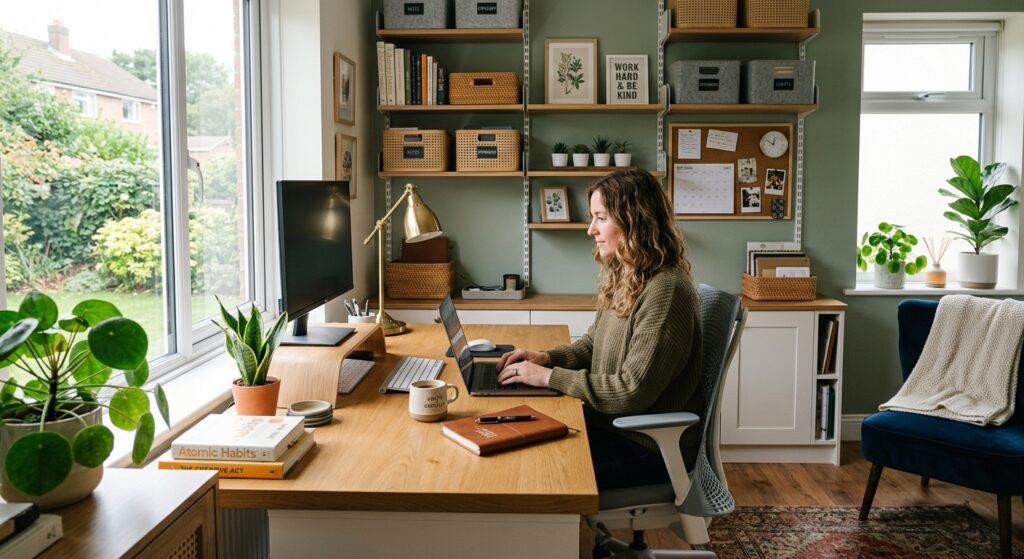

A well-designed home office can make everyday work more comfortable, organized, and convenient. Whether you work remotely, run a business, study online, or manage personal projects, having a dedicated place for your tasks can help you establish a consistent routine. You do not need an expensive renovation or an entire spare room to create a useful workspace.
The best home office ideas combine attractive design with practical features. A compact desk, a supportive chair, suitable lighting, and organized storage can transform an unused corner into a functional office. If you have more space, you can introduce additional furniture, shelving, and equipment to suit your working style.
Best Home Office Ideas for Every Space
Every home has different possibilities for creating a workspace. Some people can dedicate an entire room to their work, while others must use a bedroom, living room, or small corner. The most suitable design depends on the space available and the activities you perform.
Small Home Office Ideas for Limited Spaces
Small home offices benefit from thoughtful furniture selection and efficient storage. Start by measuring the available area and identifying a suitable position for your desk. Make sure the arrangement leaves enough room for your chair, legs, and normal movement around the room.
A narrow desk can provide a practical working surface without occupying too much floor space. Wall shelves, compact drawer units, and desktop organizers can store supplies while keeping frequently used items accessible.
Modern and Minimalist Home Office Designs
Modern home office designs often feature simple furniture, clean lines, coordinated colors, and practical storage. A minimalist approach takes this idea further by limiting unnecessary objects and emphasizing the items you genuinely use.
A desk with a straightforward design, a comfortable chair, and a small set of matching accessories can create a polished appearance. White, gray, beige, and natural wood tones offer versatile options, while darker furniture can create contrast in a well-lit room.
Cozy Home Office Ideas for a Comfortable Workspace
A cozy home office combines practical furniture with warm colors, natural textures, and personal decorations. This style works well for people who want their workspace to feel inviting rather than overly formal.
Wooden furniture, fabric accessories, a suitable rug, and carefully selected artwork can introduce warmth. A small plant or a decorative lamp can add character without requiring a major redesign.
Bedroom Home Office Ideas for Working From Home
A bedroom can accommodate a home office when a separate room is unavailable. The key is to create a distinct working area without making the bedroom feel crowded.
If space permits, place a compact desk against an unused wall or near a window. Use a small drawer unit or wall shelf to organize documents, chargers, and stationery. Choosing furniture that matches the existing bedroom decor can help the workstation blend into the room.
A folding screen, bookcase, or rug can create a visual distinction between the sleeping and working areas. These additions may help define separate zones without requiring permanent changes.
Living Room and Corner Home Office Ideas
An unused corner of a living room can become a practical workstation with a compact desk, a supportive chair, and a small storage solution. This arrangement is useful when a separate office is not possible.
Choose a position that does not block walkways or interfere with the room’s main activities. If television noise or household conversations are common, try placing the desk away from the busiest area.
Furniture that complements the living room’s existing colors and materials can make the office feel integrated into the overall design. A matching lamp, a few shelves, and a storage basket can keep work materials organized.
How to Choose the Right Home Office Furniture
Furniture affects how comfortably you can use your workspace and how efficiently you can arrange your equipment. The best choices depend on your room dimensions, daily activities, and budget.
Choosing a Desk That Fits Your Space
Begin by listing the equipment you use regularly. A laptop and notebook require less surface area than a desktop computer with multiple monitors, speakers, and printed documents.
Measure the available space before purchasing a desk. Check home office ideas width, depth, and height, and make sure there is sufficient clearance for your legs and chair. Leave enough room to move around and access nearby doors or storage units.
A straight desk suits many compact offices, while a corner desk may provide additional working surface in an appropriate layout. A height-adjustable desk is another option if you want to alternate between sitting and standing.
Selecting a Comfortable and Ergonomic Office Chair
A suitable office chair should support your body and allow you to adjust your sitting position. Look for a chair with an appropriate seat height, a supportive backrest, and enough seat depth for comfortable use.
Your feet should rest flat on the floor or on a footrest, and your shoulders should remain relaxed while you use the keyboard. Adjust the chair together with your desk and monitor rather than treating each item separately.
If possible, try a chair before buying home office ideas. Pay attention to how well it fits your body and whether its adjustments allow you to sit comfortably.
Adding Functional Shelves and Storage Furniture
Good storage keeps your workspace organized and reduces the amount of material occupying the desk. Before buying shelves or cabinets, identify what you need to store, including documents, books, stationery, and electronic accessories.
Wall shelves can make use of vertical space, while drawer units help keep smaller items out of sight. A compact storage cart may be useful if you need to move supplies between rooms.
Place frequently used materials within easy reach and store occasional-use items elsewhere. Labeled folders and containers can make home office ideas easier to find supplies when you need them.
Stylish Home Office Decoration Ideas
Decorations help establish the visual character of your workspace. The most effective designs combine personal touches with practical decisions that preserve enough room for everyday work.
Choosing the Best Colors for Your Workspace
Color is an important part of interior design because home office ideas influences the appearance and atmosphere of a room. Choose shades that complement your furniture, available lighting, and personal preferences.
Neutral colors such as white, beige, and gray can provide a simple foundation. Green, blue, terracotta, and muted yellow can introduce contrast through walls, artwork, or accessories.
Decorating Walls With Artwork and Shelves
Wall decorations can personalize an office without taking up valuable desk space. Consider framed photographs, prints, a calendar, a pinboard, or artwork that reflects your interests.
Shelves can combine decoration and storage by holding books, small containers, and a few display items. Leave enough space between objects to maintain an organized appearance.
If you regularly attend video meetings, consider what appears behind you on camera. A tidy wall, a simple bookshelf, or a carefully arranged background can create a professional appearance without expensive decorations.
Adding Indoor Plants and Natural Elements
Indoor plants can introduce natural color and texture into a home office. A small plant on a shelf or a larger plant beside the desk may complement a variety of interior styles.
Choose plants according to the amount of natural light available and the time you can spend caring for them. Consider the space they will occupy and avoid placing pots where they could spill onto electronics or documents.
Creating a Personalized and Inspiring Workspace
A personalized office should reflect your interests and the way you work. A few meaningful objects can make the space feel more inviting without overwhelming the desk.
You might display a favorite photograph, a framed quote, a small collection of books, or a souvenir from a memorable experience. A calendar or planning board can also be useful if you prefer to organize tasks visually.
Consider your work requirements before adding accessories. A writer may appreciate a notebook and a simple desk, while a designer may need space for sketches, reference materials, or creative equipment.
Home Office Lighting Ideas for Productivity
Lighting affects how clearly you can see your work and how comfortably you use a computer. A practical setup combines general room lighting, daylight when available, and task lighting for activities that require additional illumination.
Maximizing Natural Light
If your room has a window, consider placing your desk where daylight is available without shining directly into your eyes or reflecting strongly off the monitor.
Positioning the screen at a right angle to the window is a useful starting point for reducing reflections. Blinds or curtains can help manage strong sunlight at different times of the day.
If your workspace has limited daylight, suitable artificial lighting can still provide a comfortable environment. You do not need to place the desk beside a window if doing so creates glare, noise, or an awkward layout.
Choosing the Right Desk Lamps and Overhead Lighting
General lighting illuminates the room, while a desk lamp provides additional light for reading, writing, and other close-up tasks.
Choose a lamp that can be positioned where you need home office ideas. Direct its light onto the work surface without shining into your eyes or creating reflections on the computer screen.
If overhead lighting feels harsh, consider adjusting the light source or adding suitable task lighting. Aim for reasonably even illumination instead of creating a very bright desk surrounded by a dark room.
Reducing Screen Glare and Eye Strain
Glare can make a screen difficult to read and may encourage you to lean forward or change your head position. To reduce reflections, adjust the monitor angle, manage direct sunlight with blinds, and reposition lamps that shine onto the display.
Keep the monitor at a comfortable viewing distance and increase text size when necessary. Make sure the screen is clean and that home office ideas brightness is appropriate for the surrounding room.
During extended computer sessions, look away from the screen periodically and blink regularly. The 20-20-20 rule is a commonly recommended habit: every 20 minutes, look at something approximately 20 feet away for at least 20 seconds.
Smart Home Office Organization Ideas
An organized office makes home office ideas easier to locate supplies, manage documents, and keep the main work surface available for important tasks. A simple system that matches your daily routine is often more useful than an elaborate arrangement.
Keeping Your Desk Clean and Clutter-Free
Begin by removing items that you rarely use during work. Keep essential equipment and frequently used supplies accessible, then move other materials into drawers or shelves.
At the end of the day, return loose items to their designated places, organize important papers, and remove cups or rubbish. This short routine can make home office ideas easier to start the next working session.
Using Vertical Storage and Wall Shelves
Vertical storage can be helpful when floor space is limited. Wall shelves, hanging organizers, and pinboards can hold items that would otherwise occupy the desk.
Arrange materials according to how often you use them. Frequently needed items should be easy to reach, while occasional-use supplies can be stored farther away.
Organizing Documents, Cables, and Office Supplies
Create a filing system for physical and digital documents. You might separate paperwork into categories such as current projects, reference materials, financial records, and tasks requiring action.
For digital files, use descriptive names and a consistent folder structure. Back up important documents according to your needs and protect confidential information appropriately.
Cable clips, reusable ties, and under-desk trays can help keep wires organized. A dedicated place for chargers and frequently used accessories can also reduce clutter.
Ergonomic Home Office Ideas for Comfort and Health
Ergonomics involves arranging furniture and equipment to fit your body and the tasks you perform. A practical workspace should allow you to work without unnecessary reaching, twisting, or prolonged awkward positioning.
Setting Up Your Desk and Monitor Correctly
Place your primary monitor directly in front of you so you do not need to turn your head repeatedly. As a general starting point, keep the screen about 20 to 40 inches away, adjusting the distance according to its size and your ability to read comfortably.
The top of the monitor should generally be at or slightly below eye level. Your keyboard and mouse should be close enough to use with relaxed shoulders and your elbows near your body.
If you use a laptop for extended periods, consider a separate keyboard and mouse with a stand that raises the screen. This can help you position the display more comfortably without forcing your hands into an awkward typing position.
Maintaining a Comfortable Sitting Posture
Adjust your chair so your feet are supported and your back rests comfortably against the backrest. Keep your shoulders relaxed and position your arms so you can use the keyboard without reaching excessively.
Avoid leaning toward the screen to read small text. Increasing the font size or moving the monitor may help you maintain a more comfortable position.
Creating Space for Movement and Regular Breaks
Even a well-designed workstation should not encourage you to remain in the same position for hours without interruption. Build short movement breaks into your routine and use them to stand, walk, or stretch gently.
You might take a brief walk between tasks, stand while reviewing notes, or schedule breaks between meetings. If you have a height-adjustable desk, alternating between sitting and standing can provide another way to vary your working position.
Budget-Friendly Home Office Ideas
A useful home office does not require buying every item at once. Careful planning, existing furniture, and a few targeted purchases can help you create a practical workspace within your budget.
Creating a Home Office on a Small Budget
Start with the essentials: a suitable work surface, a supportive chair, adequate lighting, and the equipment needed for your tasks.
Before purchasing anything, identify what you already own and what genuinely needs replacing. Set a budget for essential items first, then allocate any remaining money to storage and decoration.
Compare dimensions, materials, durability, and practical features before buying furniture. A simple desk that fits your room may be a better choice than an expensive model with features you rarely use.
Repurposing Existing Furniture and Accessories
Look around your home for furniture that could serve a useful purpose in your office. An unused table, bookshelf, drawer unit, or storage basket may already meet some of your needs.
A spare table can work as a desk if home office ideas is stable, provides sufficient space, and allows comfortable positioning. A bookshelf can store documents, while a drawer organizer can keep stationery in one place.
You can refresh existing furniture with coordinated accessories or a suitable desk mat instead of replacing everything.
Trying Affordable DIY Home Office Projects
DIY projects can help personalize your workspace while solving everyday problems. Simple options include labeling storage boxes, creating a planning board, organizing stationery, or making a dedicated area for cables and chargers.
If you enjoy crafting, create a coordinated set of labels or arrange a small display using items you already own. These projects can improve the appearance of the office without requiring a large investment.
Keep safety in mind when building or installing anything. Secure shelves properly, respect weight limits, and avoid improvised electrical arrangements that could create hazards.
Essential Technology and Accessories for a Home Office
Technology can support remote work when home office ideas meets a genuine need. Your setup will depend on the software you use, the nature of your work, and how frequently you communicate with colleagues or clients.
Useful Gadgets for Remote Work
A reliable computer is the starting point for many home offices. Depending on your responsibilities, useful additions may include an external monitor, keyboard, mouse, webcam, headset, or document scanner.
An external monitor can provide additional screen space for people who work with multiple applications. A headset may be helpful in a shared home, while an external webcam may suit people whose built-in camera does not meet their needs.
Before purchasing accessories, identify the tasks you want to improve. Check device compatibility, available desk space, connections, and power requirements.
Improving Video Calls and Internet Connectivity
A comfortable video-call setup includes a working camera, clear audio, suitable lighting, and a reliable internet connection.
Position your camera near eye level when practical and arrange the lighting so your face is visible. Choose a relatively quiet background and test your microphone before important meetings.
Managing Cables and Charging Devices
Multiple electronic devices can create a tangle of charging cables and power leads. Start by grouping cables according to their purpose and positioning frequently used devices near suitable charging points.
Cable clips, reusable ties, and desk organizers can keep wires away from the keyboard and prevent them from crossing walkways. Labeling similar cables may also make them easier to identify.
Use chargers and power strips according to their ratings and manufacturers’ instructions. Avoid overloading outlets and replace damaged cables rather than continuing to use them.
Common Home Office Design Mistakes to Avoid
A successful workspace depends on more than attractive furniture and decorations. Avoiding common design mistakes can help you make better use of your room and budget.
Choosing Style Over Comfort and Functionality
A beautiful desk or chair may look impressive, but appearance alone does not determine whether home office ideas suits your needs. Furniture that is too high, too low, or too small may make everyday tasks uncomfortable.
Before purchasing an item, consider how you will use it. Check its dimensions, adjustability, storage capacity, and compatibility with your equipment.
Ignoring Lighting and Storage Needs
Poorly arranged lighting can make paperwork difficult to read, while reflections can interfere with screen visibility. Plan your desk position around available light and introduce task lighting when necessary.
Storage also deserves attention. Without designated places for documents, stationery, and accessories, the desk can become crowded and difficult to use.
Placing Your Workspace Near Distractions
The location of your office can affect how easily you concentrate. A desk beside a television, busy doorway, or frequently used family area may expose you to repeated interruptions.
If possible, choose a quieter location away from the busiest household activities. Headphones, a visual divider, and agreed-upon quiet periods may help reduce some distractions.
If moving the desk is not possible, consider facing away from the television or organizing demanding tasks during quieter periods of the day.
Read more: Paxtraveltweaks Explained: Tips Every Traveler Should Know
How to Create Your Perfect Home Office Step by Step
Planning your office in stages helps you make decisions based on your actual needs instead of buying furniture before understanding the available space.
Assessing Your Space and Work Requirements
Begin by measuring the room and noting windows, doors, power outlets, and existing furniture. Decide whether you need a dedicated room or whether a compact corner will be sufficient.
Next, list your regular tasks and the equipment they require. Consider computer work, video meetings, paperwork, creative projects, and storage needs.
Planning Your Layout and Budget
Sketch a simple layout before buying furniture. Mark the desk, chair, storage, lighting, and routes through the room.
Estimate the cost of essential items first, then set aside a smaller amount for optional accessories. If your budget is limited, prioritize furniture and equipment that support comfortable working.
Selecting Furniture, Lighting, and Decorations
Choose the desk and chair first because they determine much of the workspace arrangement. Add storage according to your needs, then position lighting to suit the desk and the tasks you perform.
Once the practical elements are in place, introduce decorations that complement the room. Artwork, plants, coordinated accessories, and personal objects can make the office feel complete.
Adding Personal Touches and Improving Your Setup
Use your office for several working sessions before making final adjustments. You may discover that the monitor needs repositioning, supplies should be stored closer to the desk, or additional lighting would be useful.
Address recurring problems one at a time rather than changing everything at once. Small, practical improvements can make the workspace more suitable for your routine.
Final Thoughts
Creating your perfect workspace is about finding the right balance between style, comfort, organization, and functionality. Whether you have a dedicated office or a small bedroom corner, thoughtful planning can help you make better use of the space available.
The most effective home office ideas begin with your actual needs. Choose suitable furniture, arrange lighting carefully, organize essential supplies, and introduce decorations that reflect your personality. You can make improvements gradually instead of spending a large amount of money at once.
FAQs About Home Office Ideas
1. What Are the Best Home Office Ideas for Small Spaces?
The best home office ideas for small spaces focus on efficient furniture and storage. A compact desk, supportive chair, wall shelves, and organized accessories can create a functional workspace without occupying an entire room.
2. How Can I Make My Home Office Look Stylish and Professional?
Choose a consistent color palette, practical furniture, and a few coordinated accessories. Keep cables organized, arrange shelves neatly, and use suitable lighting.
3. What Furniture Is Essential for a Home Office?
Most home offices need a suitable desk, a supportive chair, and storage for essential work materials.
4. How Can I Create a Home Office on a Budget?
Start by using suitable furniture you already own. Set a budget for essential equipment, repurpose useful storage, and add affordable decorations gradually.
5. How Can I Make My Home Office More Comfortable and Productive?
Arrange your desk, chair, keyboard, and monitor to support a comfortable working position. Ensure your feet are supported, reduce screen glare, and use appropriate lighting.