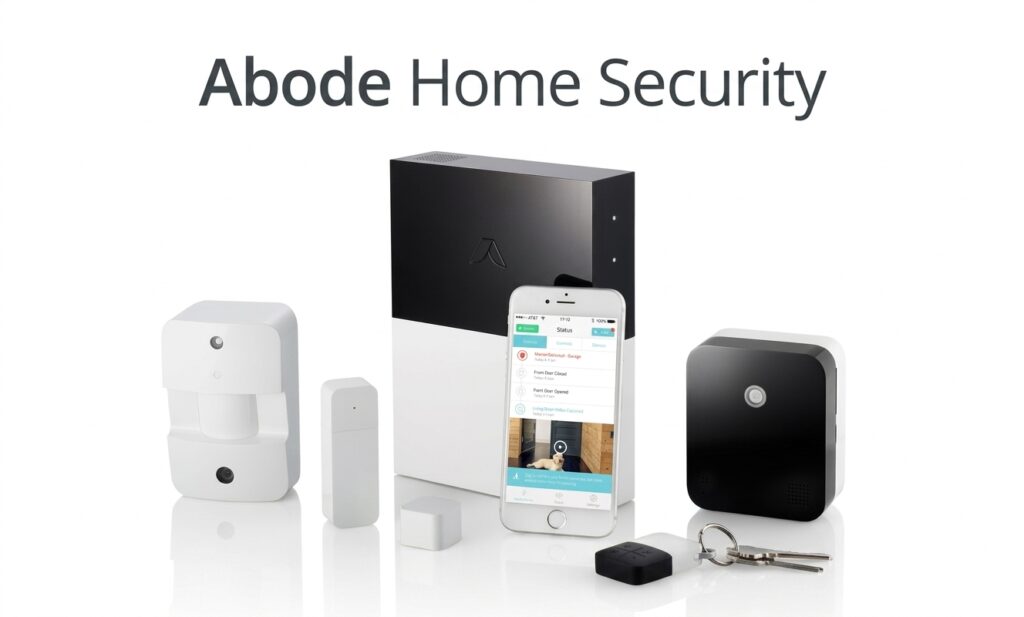

Choosing a home security system involves more than looking at the price of a starter kit. Buyers also need to consider installation, sensors, cameras, mobile access, smart-home compatibility, professional monitoring, backup connectivity, and ongoing subscription costs.
Abode Home Security takes a flexible DIY approach. Abode builds its systems around a central Hub that communicates with compatible sensors, cameras, sirens, and other accessories. The company offers different hardware configurations, including the Abode Security Kit, Smart Security Kit, and Iota Kit.
One of the main advantages of Abode Home Security is that a paid subscription is not required for basic system operation. Abode also offers Standard and Pro plans for additional features, with Pro adding automatic 24/7 professional monitoring and cellular backup.
What Is Abode Home Security?
It is a DIY security platform built around a Hub that connects compatible security devices throughout a home. Depending on the Hub and accessories selected, an Abode system can include entry sensors, motion sensors, cameras, sirens, water sensors, smoke-related devices, glass-break sensors, and other accessories.
Overview of Abode
Abode offers several security system configurations rather than requiring every customer to purchase the same equipment.
The current lineup includes the Abode Security Kit, Smart Security Kit, and Iota Kit. The Security Kit uses the standard Security Hub, while the Smart Security Kit uses the Smart Security Hub. Iota combines the Hub, camera, motion sensor, siren, and two-way voice functions into one device.
How Abode Home Security Works
The basic structure is straightforward: the Hub acts as the central point for compatible security devices. Sensors can detect events such as doors opening or motion, while cameras can provide live or recorded video depending on the configuration and plan.
The Abode app provides control over the system, including arming and disarming, viewing system activity, managing devices, and creating automations.
Who Is Abode Home Security For?
It can be suitable for people who want a DIY system that can begin with a small number of devices and expand later.
It can also appeal to smart-home users because selected Abode Hubs work with Apple HomeKit, Amazon Alexa, Google Assistant, Zigbee, Z-Wave, and other integrations. However, compatibility depends on the specific Hub, so buyers should check the Hub model before purchasing.
Abode Home Security Systems
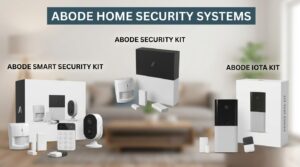 Abode currently offers several hardware options designed for different installation and smart-home requirements.
Abode Security Kit
The Abode Security Kit is the simpler entry-level option. The current package includes an Abode Security Hub, Mini Door/Window Sensor, Key Fob, power adapter, and Ethernet cable.
The Security Hub has a built-in 93 dB siren and supports Ethernet and 2.4 GHz Wi-Fi. It also has battery backup and supports 4G cellular backup when an appropriate plan is active.
Abode Smart Security Kit
The Abode Home Security Kit is designed for buyers who want a broader smart-home setup.
The current kit includes a Smart Security Hub, Mini Door/Window Sensor, Motion Sensor, Key Fob, power adapter, and Ethernet cable. The Smart Security Hub supports Apple HomeKit and additional smart-home integrations that are not available on the standard Security Hub.
Abode Iota Kit
The Iota Kit is the all-in-one option. The Iota Hub includes a built-in 1080p HD camera, PIR motion sensor, 93 dB siren, microphone, and speaker for two-way voice. It supports Wi-Fi and 4G cellular connectivity, with cellular service requiring a compatible plan.
The current Iota Kit includes the Iota Hub, Mini Door/Window Sensor, Key Fob, power adapter, Ethernet cable, and setup accessories.
Which Abode System Is Right for You?
For basic self-monitored security, the Security Kit provides a straightforward starting point. The Smart Security Kit makes more sense for buyers who want broader smart-home compatibility, particularly Apple HomeKit support.
The Iota Kit is the more integrated choice for people who want a Hub with a built-in camera, motion sensor, siren, and two-way voice in a single device.
What Comes With an Abode Security System?
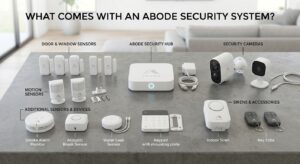
The exact equipment depends on the kit selected, but Abode’s ecosystem supports a broad range of devices.
Abode Security Hub
The Abode Home Security Hub is the central component of the basic Security Kit. It communicates with compatible AbodeRF 433 MHz devices and provides the connection between the security equipment and the Abode platform.
The Hub also includes a built-in 93 dB siren and battery backup. Its current support documentation lists Ethernet, 2.4 GHz Wi-Fi, and 4G cellular capability when a compatible plan is used.
Door and Window Sensors
Door and window sensors are used to detect whether protected entry points are open or closed.
The Mini Door/Window Sensor is included with the Security Kit, Smart Security Kit, and Iota Kit. Additional sensors can be added through the Abode app as the security system grows.
Motion Sensors
Motion sensors provide another layer of intrusion detection inside the home. The Smart Security Kit includes a motion sensor, while the Iota has a PIR motion sensor built directly into the Hub. Additional motion sensors can also be added to compatible Abode systems.
Security Cameras
Abode supports connected security cameras and provides live video through its app. The current Abode plans page states that live video can be viewed without a subscription. Additional video-storage and recording options are available through paid plans and add-ons.
Sirens and Other Accessories
Sirens provide audible alerts when an alarm is triggered. Abode also supports additional accessories designed for different security and environmental needs.
Its support documentation lists door/window sensors, motion sensors, cameras, sirens, smoke sensors, water sensors, glass-break sensors, and other devices.
Additional Sensors and Devices
One useful aspect of Abode Home Security is its expandable design. A customer can start with a basic kit and add compatible sensors and accessories later rather than installing every device at the beginning.
Key Features of Abode Home Security
The feature set depends on the Hub and subscription plan, but the platform combines security functions with smart-home controls.
DIY Installation
Abode Home Security is designed for DIY installation. Abode provides guided setup instructions through its app, and the included devices in several kits are already paired with the Hub.
Abode Mobile App
The Abode app is the main control interface. It can be used to arm and disarm the system, view system activity, manage devices, and access supported camera functions. Abode provides the app for iOS and Android, with additional support for selected smartwatch and TV platforms.
Home, Away, and Standby Modes
Abode provides three primary system modes. Away mode activates door/window sensors and interior motion sensors.
Home mode keeps door/window sensors active while interior motion sensors are disabled.
Standby mode turns off intrusion sensors while certain environmental sensors, such as water and CO sensors, can remain active.
Security Alerts and Notifications
Abode Home Security can send notifications when security events occur. The current plans page also lists rich notifications that can include device names, helping users identify which device generated an alert.
Remote System Access
The Abode app allows users to access and control supported system functions remotely. This includes checking system status, managing devices, and viewing supported camera feeds.
Smart Home Automation
Abode provides its CUE automation system for creating automated actions based on system states, sensor events, and schedules.
The Smart Security Hub also supports broader smart-home integrations, while supported Adobe systems can work with platforms such as Alexa, Google Home, Apple HomeKit, Zigbee, and Z-Wave depending on the Hub and device.
Battery Backup
Battery backup is available on Abode Hubs, although specifications vary by model. The current Security Hub setup documentation lists up to 24 hours of battery backup under its stated conditions. The Smart Security Hub product page lists up to five hours of power during an outage.
Cellular Backup
Cellular backup is available with compatible Hubs and the Pro Plan. Abode’s current documentation states that its cellular backup can help maintain connectivity when internet service is unavailable. Cellular coverage is not guaranteed in every location, so signal strength at the installation site matters.
Professional Monitoring
Professional monitoring is available through Abode’s Pro Plan. The Pro Plan provides automatic professional monitoring, while Abode also offers a user-initiated monitoring feature for Standard Plan users at no additional cost. These are different services and should not be treated as equivalent.
Abode Home Security Pricing
Pricing has two parts: the cost of the hardware and the optional subscription. Current Abode product pages show the Security Kit at $150 regular price, the Smart Security Kit at $240 regular price, and the Iota All-In-One Security Kit at $399 regular price. Abode is currently displaying promotional prices on these pages, so checkout pricing can differ from the regular price.
Security Kit Pricing
The current official product page lists the Abode Security Kit at $150 before the displayed promotion and $75 with the promotion shown on the page. Promotions can change, so buyers should confirm the price at checkout.
Smart Security Kit Pricing
The Smart Security Kit is currently listed at $240 before the displayed promotion, with the page showing a promotional price of $120.
Iota Kit Pricing
The Iota All-In-One Security Kit is currently listed at $399 before the displayed promotion, with the page showing $199 at the time of this review.
No-Subscription Option
Abode Home Security can be used without a paid subscription. Abode states that basic use can include app access, live video, supported smart-home integrations, and real-time push notifications without a paid plan. However, subscription plans add features such as extended event history, AI detection, professional monitoring, cellular backup, and other services.
Standard Plan
The Standard Plan is currently $8.49 per month or $79.99 per year. Abode positions Standard as its self-monitoring plan. The current plan comparison lists features including an extended event timeline, AI smart detection, rich notifications, and other enhanced features.
Pro Plan
The Pro Plan currently costs $26.99 per month or $245.99 per year. It includes the Standard features plus automatic 24/7 professional monitoring and cellular backup.
Monthly vs. Annual Pricing
The annual plans have a lower effective monthly cost than paying month to month. Abode also states that its plans are contract-free and can be changed or cancelled through the Abode app.
Does Abode Require a Subscription?
No. A subscription is not mandatory for basic operation.
What You Get Without a Subscription
Without a paid plan, users can still access the Abode app, receive real-time push notifications, use supported smart-home integrations, and view live video from connected cameras.
What the Standard Plan Adds
The Standard Plan adds features intended primarily for enhanced self-monitoring, including extended event history, AI-based smart detection, and richer notifications.
What the Pro Plan Adds
The Pro Plan adds automatic 24/7 professional monitoring and cellular backup in addition to Standard features.
When Professional Monitoring Is Useful
Professional monitoring can be useful for people who do not want to be solely responsible for responding to every alarm.
How to Install Abode Home Security
Abode Home Security is designed to be installed without professional installation for the standard kits covered by Abode’s setup guides.
What You Need Before Installation
For the Security Kit, Abode lists a compatible iOS or Android smartphone or tablet, an AC outlet near the router, a spare Ethernet port for initial setup, and the activation key included with the kit.
Setting Up the Abode Hub
The basic process involves connecting power, connecting the Hub to the router with Ethernet for initial setup, activating the battery backup, and completing setup through the Abode app.
Abode’s current Security Kit guide states that Ethernet is required for initial setup, after which the Hub can use its supported network connection.
Connecting the Abode App
After connecting the Hub, users open the Abode app and follow the on-screen setup instructions. The activation key is used to link the Hub to the user’s Abode account.
Installing Sensors
The included sensors can be positioned at appropriate entry points using the supplied mounting materials. Additional devices can be added through the app by selecting the appropriate device category and following the setup prompts.
Adding More Devices
The platform is expandable. Abode’s support documentation specifically explains that users can start with a small kit and add additional compatible devices later.
Arming and Disarming the System
Users can select Away, Home, or Standby mode from the Abode app. For the Security Kit, Abode lists a default one-minute exit delay and one-minute entry delay, both of which can be adjusted through system settings.
Abode Home Security Monitoring
Monitoring is one of the areas where Abode offers multiple choices.
Self-Monitoring
Self-monitoring means the homeowner receives system alerts and decides how to respond.
This approach can be used without a paid plan, although additional Standard features are available for customers who want more event history and detection capabilities.
Professional Monitoring
The Pro Plan provides automatic 24/7 professional monitoring. According to Abode, the monitoring service can handle alarms involving burglary, fire, smoke, carbon monoxide, panic, medical situations, and other supported events.
Cellular Backup
With Pro, compatible Abode Hubs can use cellular connectivity when the normal internet connection becomes unavailable.
Abode notes that cellular coverage depends on the location and the available carrier signal, so cellular backup should not be treated as guaranteed everywhere.
Emergency Response
When an alarm is automatically sent to professional monitoring, the monitoring service can follow its established procedures for contacting the user and appropriate emergency responders.
Standard users who activate User Initiated Professional Monitoring can manually refer an alarm to the monitoring center rather than relying only on self-monitoring.
Monitoring Without a Long-Term Contract
Abode states that its plans are contract-free. Customers can use monthly or annual options and change or cancel plans through the app.
Abode App and Smart Home Integration
The app is an important part of the Abode Home Security experience because many system controls are handled digitally.
Controlling Abode Through the App
The app can be used to control the security system, view system events, manage devices, and access supported cameras.
CUE Automations
CUE allows users to create automated actions based on events, schedules, and system states. The Smart Security Hub setup guide provides an in-app process for creating CUE automations.
Amazon Alexa
Supported Abode systems can integrate with Amazon Alexa. The exact functions depend on the connected Abode Hub and devices.
Google Assistant
Abode also supports Google Assistant/Google Home integration on supported systems.
Apple HomeKit
Apple HomeKit support is Hub-dependent. The Iota Hub and Smart Security Hub support HomeKit, while the standard Abode Security Hub does not. Abode’s HomeKit documentation also explains that the Iota camera can provide a live stream in Apple Home, while Abode’s other cameras are not HomeKit-compatible.
Other Smart Home Integrations
The current Abode plans page lists additional integrations including Home Assistant, IFTTT, Zigbee, Z-Wave, Sonos, and others. Compatibility can vary according to the Hub and individual device.
Read more: 20 Modern Home Decorations Ideas for a Beautiful and Comfortable Home
Abode Iota Review
The Iota is one of the most distinctive products in the Abode Home Security lineup because it combines several functions inside one Hub.
Built-In Camera
The Iota includes a built-in 1080p HD camera with a 152-degree diagonal field of view and color night vision, according to Abode’s current Iota documentation.
Built-In Motion Sensor
The Iota includes a PIR motion sensor with adjustable sensitivity. This removes the need to purchase a separate motion sensor for basic motion detection at the Hub’s location.
93 dB Siren
A 93 dB siren is built into the Iota Hub.
Two-Way Voice
The Iota includes a built-in microphone and speaker, allowing two-way voice communication through the device.
Wi-Fi and Cellular Connectivity
The Iota supports Wi-Fi and 4G cellular connectivity. Cellular backup requires a compatible plan.
Smart Home Compatibility
Iota supports Apple HomeKit, Amazon Alexa, Google Assistant, and CUE automations.
Abode Home Security Pros and Cons
| Pros | Cons |
| DIY installation | Standard Security Hub does not support Apple HomeKit |
| No paid subscription required for basic operation | Features vary significantly between Hubs and subscription plans |
| Expandable device ecosystem | Automatic professional monitoring requires Pro |
| Multiple Hub choices | Cellular backup requires a compatible paid plan |
| Optional professional monitoring | Hardware prices can change because of promotions |
| Pro Plan cellular backup | Cellular backup availability depends on local cellular coverage |
| Apple HomeKit support on Iota and Smart Security Hub | Some advanced features require a paid subscription |
| Alexa and Google Assistant support | Hub capabilities differ by model |
| CUE automation capabilities | Choosing the right Hub may require comparing features |
| Iota combines several security functions in one device | Some integrations are limited to compatible Hub models |
Abode Home Security Review
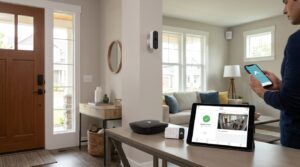
Overall, Abode Home Security stands out for flexibility rather than a one-size-fits-all package.
Features and Security Options
The platform supports a broad range of sensors and accessories, allowing users to build a system around their home rather than being limited to the equipment included in one starter package.
Installation Experience
The official setup guides are designed around DIY installation and provide step-by-step instructions through the app. Several kits include pre-paired devices, reducing the amount of initial configuration required.
App and Ease of Use
The app brings system controls, device management, alerts, automation, and camera access into one interface. This makes the software an important part of the overall experience.
Monitoring Choices
Abode gives users several monitoring approaches: self-monitoring, Standard with user-initiated professional monitoring, and Pro with automatic 24/7 professional monitoring.
Smart Home Compatibility
Smart-home compatibility is a major strength, but buyers must choose the right Hub. The standard Security Hub does not support Apple HomeKit, whereas the Smart Security Hub and Iota do.
Equipment Flexibility
The ability to start with a basic kit and add compatible devices later can make Abode practical for users whose security needs may grow over time.
Overall Value for Money
The value depends on how much of the ecosystem a homeowner actually needs. Someone who only wants basic self-monitoring may not need a paid plan, while a buyer who wants automatic professional monitoring and cellular backup will need the Pro Plan.
Abode Security Kit vs. Smart Security Kit vs. Iota
| Feature | Security Kit | Smart Security Kit | Iota Kit |
| Main Hub | Security Hub | Smart Security Hub | Iota Hub |
| Built-in camera | No | No | Yes |
| Built-in motion sensor | No | No | Yes |
| Built-in siren | 93 dB | 93 dB | 93 dB |
| HomeKit | No | Yes | Yes |
| Alexa | Yes | Yes | Yes |
| Google Assistant | Yes | Yes | Yes |
| CUE | Supported | Supported | Supported |
| Cellular backup | With compatible plan | With compatible plan | With compatible plan |
| Best suited to | Basic security | Smart-home users | All-in-one security |
The main difference is the Hub. The Smart Security Hub adds broader smart-home compatibility, while Iota combines a camera and motion sensor with the Hub.
Is Abode Home Security Worth It?
For buyers who want a flexible DIY system, Abode Home Security can be a strong option because it provides several hardware choices, expandable devices, optional subscriptions, and multiple smart-home integrations.
Reasons to Choose Abode
The strongest reasons include DIY installation, expandable equipment, no-subscription basic operation, optional professional monitoring, and different Hub choices.
Who May Benefit Most
Abode may be particularly useful for homeowners, renters, apartment residents, and smart-home users who want to build their system gradually rather than purchase a large professionally installed package.
Who May Prefer Another System
Someone who wants mandatory professional installation, a highly standardized equipment package, or a system where every Hub has identical smart-home compatibility may prefer another security provider.
What to Consider Before Buying
Before purchasing, check the exact Hub, including equipment, current hardware price, subscription cost, HomeKit requirements, cellular coverage, and the features included with the selected plan. These details can differ between Abode products, so comparing only the brand name is not enough.
Final Thoughts
Abode Home Security provides a flexible DIY approach to home protection, with different Hubs, kits, accessories, and monitoring options.
The Security Kit offers a straightforward starting point, while the Smart Security Hub provides broader smart-home capabilities. Iota is designed as an all-in-one solution with a built-in camera, motion sensor, siren, and two-way voice.
Basic operation does not require a paid subscription, while optional plans add features such as professional monitoring and cellular backup. Before buying, compare the Hub, equipment, subscription costs, and features you actually need.
FAQs About Abode Home Security
Does Abode Home Security Require a Subscription?
No. Basic use does not require a paid subscription. Optional plans add features such as professional monitoring, extended event history, AI detection, and cellular backup.
How Much Does Abode Home Security Cost?
Abode offers different kits and subscription plans, with prices varying by model and promotions. Check the official Abode website for the latest pricing.
Is Abode Home Security Easy to Install?
Yes. Abode systems are designed for DIY installation, with setup instructions provided through the Abode app and support documentation.
Does Abode Offer Professional Monitoring?
Yes. The Pro Plan includes automatic 24/7 professional monitoring. Other monitoring options may also be available depending on the plan.
Does Abode Work Without Wi-Fi?
Some local security functions can continue during an internet outage. Compatible Pro systems can also use cellular backup where supported.
Does Abode Support Apple HomeKit?
Yes, but support depends on the Hub. Iota and Smart Security Hub support HomeKit, while the standard Security Hub does not.
Does Abode Work With Alexa and Google Assistant?
Yes. Abode supports Amazon Alexa and Google Assistant/Home integrations.
Can You Add More Devices to Abode?
Yes. Compatible sensors, cameras, and other accessories can be added as your security needs grow.